

All information at a glance – the decision is yours
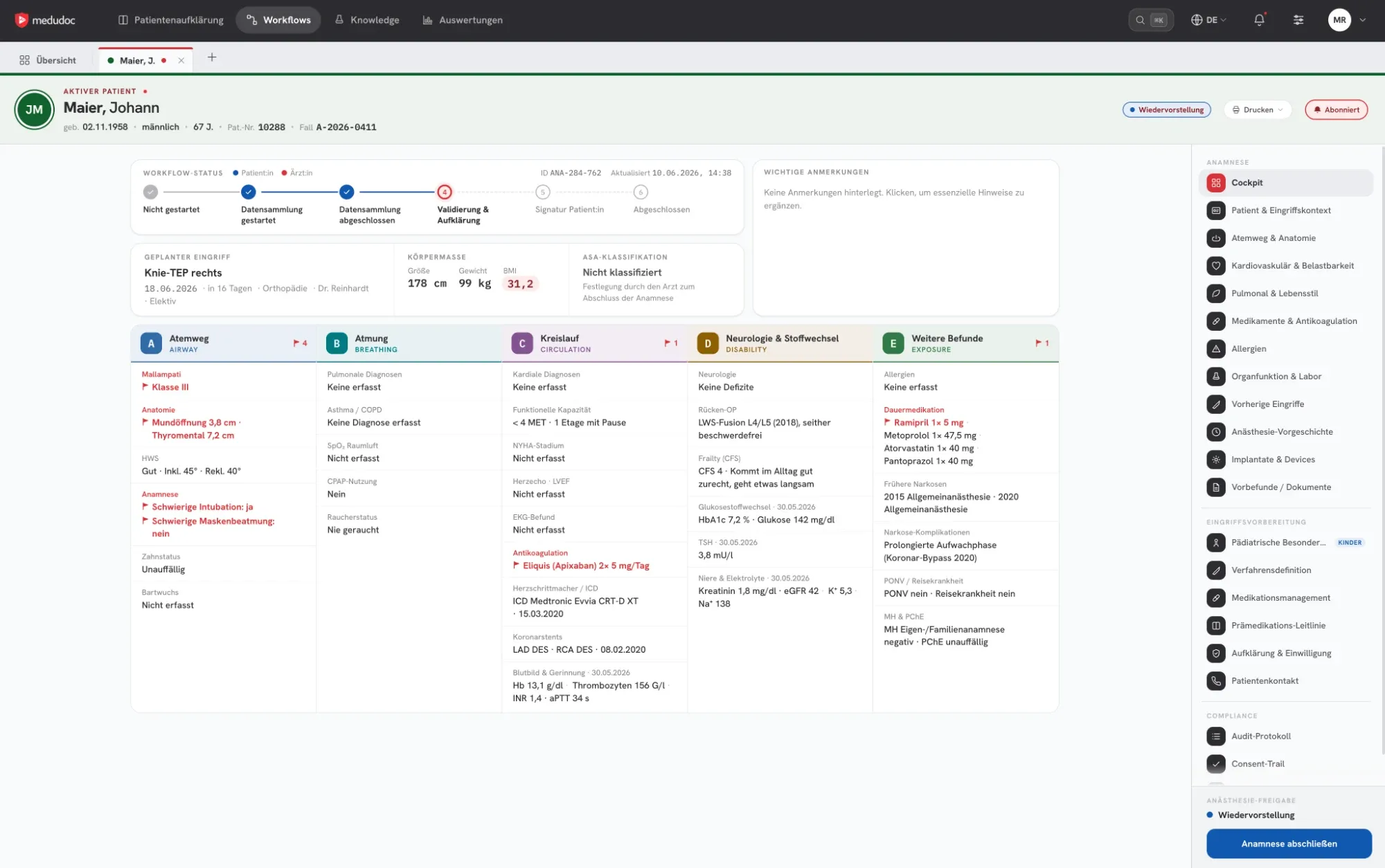
Capturing data is only the first part. medudoc also provides an interface in which physicians can view, review and approve each case in full – the Healthcare Professional Dashboard (HCP Dashboard).
Evaluation
A questionnaire alone only delivers data
Only an interface for evaluation makes the medical history usable. medudoc shows each case completely, clearly and with sources – instead of spread across paper, scans and systems.
All cases in one place
Cases are sorted by processing status, from data capture to completed consent. Completeness and urgent cases are visible immediately.
The full picture for each case
Medical history, medication, allergies and findings are shown in one view. Physicians see prepared cases instead of raw data.
Flag, don't assess
Standardised key figures such as BMI and notable entries are flagged for each case. The physician assesses what they mean.
Medication information
For the medications captured, the active substance, interactions and the preoperative recommendations of the specialist societies are stored, each with a professional source.
Findings with source reference
Extracted values can be checked quickly via the reference to the original document.
Patient education status in the case
Which patient education content was selected and how far patient education and consent have progressed is shown directly in the case.
Quick or detailed
Brief where appropriate. Detailed where necessary.
Depending on the risk captured, medudoc distinguishes between a detailed medical history and a quick medical history. Especially for young patients without pre-existing conditions and without medication, this saves time – during capture and during review.
Quick medical history
- For patients without pre-existing conditions and without long-term medication
- Fewer questions, shorter capture
- Compact view for a fast medical review
Detailed medical history
- For pre-existing conditions, medication or notable entries
- In-depth follow-up questions on every relevant topic
- Full case view with medication, findings and sources
Medical decision
medudoc flags. You decide.
medudoc is not a medical device within the meaning of the EU Medical Device Regulation (MDR). The platform collects, organises and visualises the information; physicians carry out the medical classification.
Display and prepare
The platform brings together all the information on a case and makes it clearly visible.
- Present data in a structured way
- Calculate and display key figures
- Flag notable entries
Assess and approve
The physician classifies the information, grades the risk and decides on the next steps.
- Grade the risk, for example using ASA
- Choose the form of patient education: on site or telemedical
- Approve the case
Elective and emergency
One case – no matter who captures the information
For planned procedures, patients enter their medical history themselves. In an emergency, medical staff capture all information, with dedicated input forms for fast capture. After that, all steps are the same.
Patients enter the data
For planned procedures with lead time.
- 1
Patients receive the invitation to the workflow.
- 2
They complete the digital medical history at home or in the hospital.
- 3
Physicians review the case and approve it.
Patients prepare at their own pace, and the clinic receives complete data.
- 1
Medical staff enter the data
For emergencies or when patients cannot answer themselves.
Medical staff create the case.
They capture the information using dedicated input forms.
- 3
Physicians review the case and approve it.
A complete, structured case is created even without the patient's involvement.
Uniform downstream processes
Patient education video, consent sheet, consent and handover run the same way in both cases.
What complete data makes possible
The basis for personalised patient education
Only when the medical history is complete and reviewed by a physician can patient education be tailored to the person.
1. Complete medical history
Pre-existing conditions, medication, allergies and findings are available in structured form.
2. Medical review and approval
The physician grades the case, determines the form of patient education and approves the case.
3. Personalised video and personalised sheet
medudoc generates the patient education video and consent sheet based on medical history and procedure.
Next in the workflow
- Patient education videoPersonalised patient education videos for each procedure, with subtitles and a reading version.Learn more
- Digital consent sheetPatient-specific consent sheet with electronic signature.Learn more
- Digital medical historyOne questionnaire for surgery and anaesthesia – adaptive, with medication by photo and upload of findings.Learn more
- Consent discussionOn site or telemedical – prepared by video and consent sheet.Learn more
See your cases in the HCP Dashboard
In a demo, we show you the case view, the quick medical history and data capture by your medical staff.